Docker Image vs Docker Container – Differences with Examples
Docker images and Docker containers are core concepts every Docker beginner must understand.
In simple terms, a Docker image is a read-only template, while a Docker container is a running instance created from that image.
In this guide, you’ll learn: - What a Docker image is - What a Docker container is - Key differences between images and containers - Real Docker examples using Ubuntu
What is a Docker Image?
A Docker image is a lightweight, immutable, read-only template that contains everything required to run an application: - Application code - Runtime - Libraries - Dependencies
Docker images are used as blueprints to create containers.
All Docker images are stored in a Docker registry, most commonly Docker Hub.
👉 Docker Hub: https://hub.docker.com
What is a Docker Container?
A Docker container is a running instance of a Docker image.
When a container is created: - The image stays unchanged (read-only) - A writable layer is added on top - The application starts running
If the container stops, the image remains intact.
Docker Image vs Docker Container – Comparison Table
| Feature | Docker Image | Docker Container |
|---|---|---|
| Nature | Static | Dynamic |
| State | Read-only | Read-write |
| Purpose | Blueprint | Running application |
| Created using | Dockerfile | docker run |
| Stored in | Docker registry | Host system |
| Lifecycle | Does not run | Can start, stop, restart |
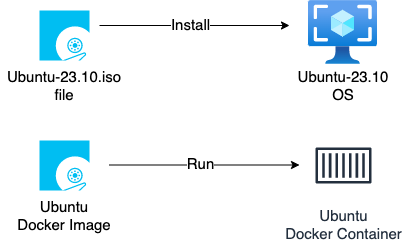
ISO Image vs Docker Image (Easy Analogy)
An ISO image is a static installation file. Applications run only after the operating system is installed and started.
Similarly: - A Docker image is a static package - A Docker container runs applications from that image
Pulling Docker Images from Docker Hub
Check existing images on the server:
docker image ls
Pull the Ubuntu image:
docker pull ubuntu
By default, Docker pulls the latest tag.
Pulling a Specific Image Tag
Docker images follow this format:
IMAGE_NAME:TAG
Example:
docker pull ubuntu:23.10
Verify images:
docker images
Creating a Docker Container from an Image
Create a container using the Ubuntu image:
docker run -it ubuntu:23.10 bash
Inside the container:
pwd
ls
id
cat /etc/os-release
This confirms that the container is running Ubuntu 23.10 using the image.
Image and Container Relationship
- One image ➜ multiple containers
- Containers can be stopped or removed
- Images remain unchanged
FAQs
Is a Docker container an image?
No. A Docker container is created from an image and represents a running process.
Can one Docker image create multiple containers?
Yes. A single image can be used to create multiple containers.
What happens when a container stops?
The container stops running, but the image remains unchanged.
Next Steps
👉 What is Docker?
👉 How to Install Docker on Linux
🧠 Quick Quiz — Docker Image vs Container
Which of the following statements is true?
When you delete a Docker container, what happens to the image it was created from?
Can you create multiple containers from a single Docker image?
Important Tips
Tip
Immutability: Think of Docker images like a CD-ROM or a read-only ISO file. You can't change the data on it once it's burned (built). To change the application, you must build a new image.
Note
Layers: Docker uses a layered file system. When you start a container, Docker simply adds a thin, writable layer on top of the read-only image layers. This makes starting containers extremely fast and storage-efficient.
📝 Want More Practice?
👉 Test your knowledge – Take the Docker Basics Quiz
📬 DevopsPilot Weekly — Learn DevOps, Cloud & Gen AI the simple way.
👉 Subscribe here